Here are some things that you can do to help keep your Nest camera secure, and some tips on what to do if something happens to your camera or if it's stolen.
Use your camera as a deterrent
A highly visible security camera can help deter potential intruders.
If you want your camera to help discourage intruders, Install your camera in a place where it can easily be seen and make sure that its status light is on.
If you prefer your camera to blend in, think of ways that it can visually tie into things that are already there, like similarly coloured items on a shelf.
Use security accessories for Nest Cam (battery)
Use the anti-theft screws (Nest Cam battery and floodlight)
If you’re installing a Nest Cam battery with the floodlight, make sure that you use the included anti-theft screws.
Anti-theft mount
When you place or install Nest Cam (battery) indoors or outdoors, use the Wasserstein Anti-Theft Mount to help prevent theft and fall damage to your camera.
You can purchase the Wasserstein Anti-Theft Mount in the GStore.
Secure the power cable
Indoor cameras
- Run your camera’s power cable behind furniture or shelving so that it’s harder to spot and unplug.
- Install cable clips to help keep the power cable attached to the wall. Check your local hardware shop for availability.
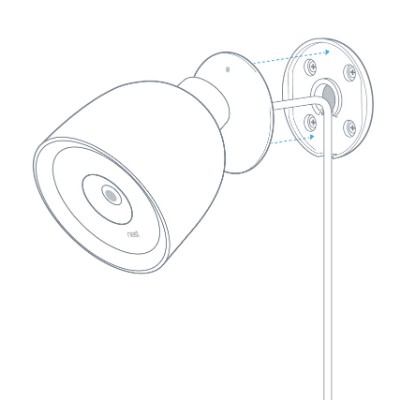
Google Nest Cam IQ Outdoor
| This camera has a locking base that can completely conceal the power cable. Drill a ½" hole in your wall, run the cable through it and plug it into an indoor socket. Make sure that you identify any in-wall pipes or wiring before drilling the hole, or find a local pro to install it for you. |  |
|
If you need to run the power cable along your exterior wall, make sure that you use the included cable clips to secure it.
|
 |
Google Nest Cam Outdoor
- This camera’s cable is permanently attached to the camera.
- Use the included clips and screws to fasten the cable to a wall or surface.
- Use a clip near the camera to prevent someone from yanking on the cable to dislodge the camera.
- Run the cable along an edge, eave or another hidden area.
- Paint the power cable and clips to match your home.
Note: Don’t paint or cover the camera. This can affect its sensors and performance and may void the warranty. - If your Nest Cam Outdoor is plugged into an outdoor socket, install a lockable 'while in use' or 'water and dust' cover that will help prevent it from being unplugged.
- Run the flat USB cable through a doorway and plug it into an indoor socket. Keep the cable out of reach by routing it through the top of the door.
- Drill a ⅞” hole through the wall and run the cable through it to plug it into an indoor socket. Make sure that you identify any in-wall pipes or wiring before drilling the hole, or find a local pro to install it for you.
Save your video history in the cloud
The Home app and the Nest app let you watch a live video stream from your camera. If you get a Nest Aware subscription, you get additional intelligent alerts such as familiar faces, and you’ll also be able to review your video history.
Most Nest camera’s video footage is stored securely in your account in the app. Even if your camera is stolen, thieves won’t be able to view or tamper with your footage.
Note: The Nest Cam (battery) and Nest Doorbell (battery) include up to one hour of recorded video for on-device storage that is only used as a backup if the camera can’t upload video to the cloud (for instance, if it can’t connect to Wi-Fi).
Increase the security of your account in the app
Your account is password-protected. To help prevent someone from signing in and making changes without your permission, never share your password with anybody else.
You can add an extra layer of security by signing into the app with 2-Step Verification. To learn more about 2-Step Verification and how to set it up on your account, see:
Nest app only: If you want to let someone else watch live video from your Nest camera but not give them access to your Nest home, you can share just the video stream through a password-protected link.
What to do if your camera gets damaged or stolen
- Review alerts and video footage to see what happened
- Your Nest camera can send an Activity Alert if it spots the vandal or thief, and you can also get a notification if it’s destroyed or taken out of range of your Wi-Fi network and goes offline. The email includes a snapshot of the last thing seen by your camera.
- For cameras with a Nest Aware subscription, review your video history to see exactly what happened. Watching someone break into your home can be uncomfortable. But it can help you understand how it happened and what steps to take to prevent another incident.
How to watch your video history - You may also want to share the footage with the police. You can do this by creating a video clip of the incident.
How to create a video clip - If your camera was only moved or unplugged, you may want to find a new spot for it.
Theft replacement programme
If your Nest camera or doorbell is stolen, you may qualify for a replacement. Please go to the following article to learn more.