Nest Wifi points have a built-in speaker with the Google Assistant, so you can play music, manage your Wi-Fi network, find answers, control your connected devices, and more using just your voice.
You can adjust the Nest Wifi point speaker volume and light brightness from your device settings. This is a good option if you want to customize the volume and brightness of the point for your home but still want to use the Assistant.
Adjust the volume and brightness of your Nest Wifi point
Adjust the volume
| Turn up the volume |
Note: This only adjusts the volume of media and your Google Assistant. At volume level 0, all media will be muted but your Google Assistant will still speak at a minimum level. Adjusting the Google Assistant and media volume doesn’t adjust the volume of alarms and timers. |
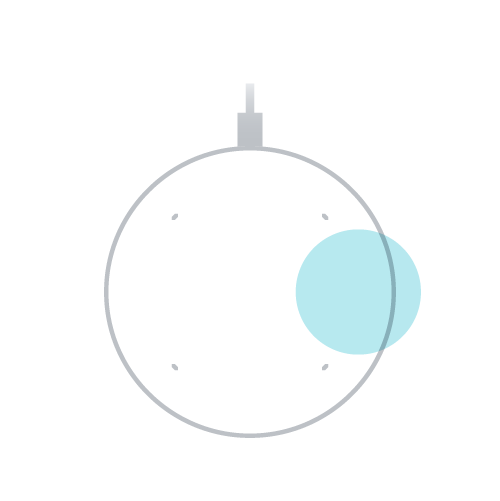 |
| Turn down the volume |
Tap on the left side of Nest Wifi point. 10 total taps will mute all audio except your Google Assistant. Note: This only adjusts the volume of media and your Google Assistant. At volume level 0, all media will be muted but your Google Assistant will still speak at a minimum level. Adjusting the Google Assistant and media volume doesn’t adjust the volume of alarms and timers. |
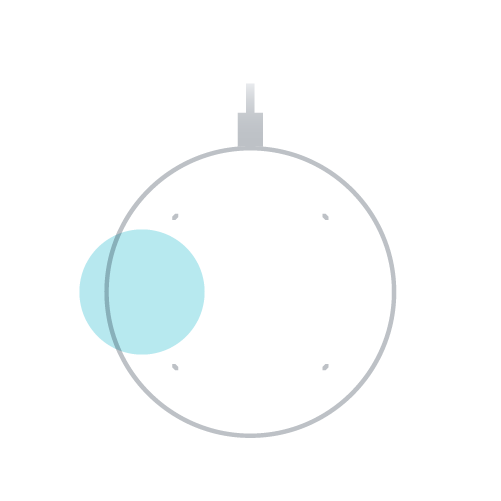 |
Change light brightness
- Open the Google Home app
.
- Tap Favorites
or Devices
- Tap and hold your device's tile.
- Tap Settings
Lights.
- Under “Status light brightness,” choose a brightness level, or turn it off.
 .
.
 Lights.
Turn off the Google Assistant on your Nest Wifi point
You can turn off the Google Assistant at any time by following the steps below.
Turn off the microphone
Turning off the microphone prevents the Nest Wifi point from listening or responding to your queries. You can continue to use it as a speaker via Cast or Bluetooth.
- Use the switch on the back of the Nest Wifi point next to the power cord to turn off the microphone.
- You’ll know the microphone is off when the on or off switch shows an orange color.
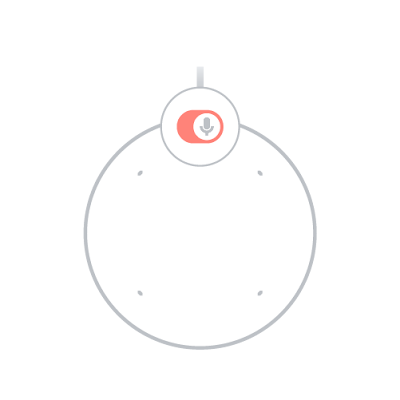
Turn off the mute light on the Nest Wifi point
When the microphone on the Nest Wifi point is off, a glowing orange light will appear under the device. You can choose to turn off this glowing orange light under the device settings:
- Open the Google Home app
- Tap Favorites
- Tap and hold your device's tile.
- At the top right, tap Settings
- Switch on Turn off mute light.
Learn more about data security and privacy on our connected home devices with the Google Assistant.