In an insertion order, if you enable auto budget allocation, Display & Video 360 will optimize how your insertion order's budget is spent by dynamically shifting money between the insertion order's line items. Auto budget allocation will increase the budgets for high-performing line items by taking money away from lower-performing line items.
Would automatic budget allocation be useful for you?
You should consider using automatic budget allocation if your insertion orders have CPC or CPA goals, and your line items require regular rebalancing of their budgets to ensure spend is allocated according to performance.
When shouldn't I use automatic budget allocation?
Don't use automatic budget allocation if your insertion order…
- Has a flight of less than 2 weeks.
- Is for "brand" purposes, and isn't aiming to drive clicks or conversions.
- Contains line items with a mixture of CPC and CPA bid strategies.
- Contains only one line item.
Performance of line items
Display & Video 360 judges the performance of line items by comparing the goals set for your insertion order (for example, CPA).
What if my line items don't track conversions?If your line items don't track conversions, Display & Video 360 will compare line items based on their CPCs. Similarly to CPAs, lower CPCs indicate "better performance."
When a line item is performing well, Display & Video 360 can increase its daily budget. In certain situations (such as in the event you've increased your insertion order's budget), Display & Video 360 can increase a well-performing line item's budget much more than 20% day-over-day. However, in the end, your line item's spend will always be capped by the insertion order's budget.
In contrast to well-performing line items, Display & Video 360 can decrease the daily budget of lower-performing line items by up to 20% each day.
Budget considerations
Automatic budget allocation uses the insertion order's budget—not the combined total of the line items' budgets—to determine the total amount of budget that's divided among the line items in the insertion order.
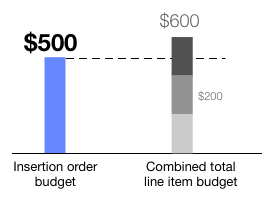
Show me an exampleFor instance, say you have an insertion order with 3 line items. The insertion order's budget is $500, but each line item has a budget of $200.
In this example, the insertion order's budget of $500, and not the line items' combined total budget of $600, will be divided among all line items in the insertion order.
Pacing
Ultimately, automatic budget allocation will aim to fulfill the pacing setting of the insertion order. Because of this, make sure your insertion order is set up with the appropriate pacing option for your advertiser's needs.
Turn on auto budget allocation
To enable auto budget allocation, open an insertion order, navigate to the Settings tab, then check the box next to Auto Budget Allocation.
Best practices
To get the most out of auto budget allocation:
- Set realistic, fixed starting budgets for each line item and try to get your line items' budgets to add up to your overall insertion order budget.
- Use a supported goal. All goals are supported except for CPE and Other.
Frequently asked questions
How does auto budget allocation work?When automatic budget allocation is enabled, Display & Video 360 looks at recent performance data to infer how your insertion order's budget can best be allocated across its line items. This is done by first considering your line items' ability to spend your insertion order's budget, and then by allocating your insertion order's budget according to the performance of individual line items.
In the absence of inventory limitations, the best performing line items will be prioritized over less well-performing line items. If you aren't tracking conversions, Display & Video 360 will optimize based on each line item's CPC.
Iif your line items are relatively new, Display & Video 360 will require a few days of data collection before auto budget allocation can start to rebalance your line items' budgets.
-
Your line items' budgets will be changed.
Display & Video 360 can start to change the budgets for the line items in your insertion order as soon as you enable automatic budget allocation. Additionally, Display & Video 360 will automatically set finite budgets for any line items that previously had an "unlimited" budget.
As soon as Display & Video 360 starts to change your line items' budgets, the changes can't be undone. Moreover, if you later disable auto budget allocation, your line items' budgets will not be restored to their original budgets, so make sure you only enable auto budget allocation in insertion orders where you're comfortable with your line item budgets being changed.
-
Unlimited budgets
Line items with unlimited budgets will be given finite, flight-paced budgets, as follows:
-
Line items with flight pacing:
For each line item with an unlimited budget and flight pacing, Display & Video 360 will set the line item's starting budget equal to the insertion order's overall budget. However, since the line items in an insertion order are constrained by the insertion order's overall budget, each line item will spend less than their new starting budgets. After line items are given their initial finite budgets, Display & Video 360 will rapidly adjust the budgets of each line item based on their relative performance.
Show me an exampleFor example, if you have an insertion order with a budget of $100,000, Display & Video 360 will assign an initial budget of $100,000 to each line item that previously had an unlimited budget and flight pacing. As these line items serve, their budgets will be adjusted rapidly.
-
Line items with daily pacing:
Display & Video 360 will convert a line item's unlimited budget to a finite budget according to the following formula:
Daily spending goal × number of days = Line item's starting budget
For example, if a line item was initially set up to spend its budget at $100 per day, and the line item has 14 days left in its flight, Display & Video 360 would set the line item's budget to $1400 as a starting point.
-
-
Line items with impression-based daily budgets
Impression-based budgets will be converted into monetary budgets according to the following formula:
CPM bid × daily impression goal × number of days = Line item's starting budget
As with any time auto budget allocation is turned on, budgets will be moved from any under-pacing or under-performing line items to other, better pacing and better performing line items, depending the available line items' performance and ability to spend their budgets.
If all line items in your insertion order are underpacing, budget allocations may seem unusual as budgets are shifted from one under-pacing line item to another. In some cases where the performance is best on a few line items, budgets of under-pacing and under-performing line items can be almost entirely re-allocated to the better performing line items.
Yes. To see the changes made to individual line item budgets by auto budget allocation, review your line items' event history.
Can line items be excluded when setting up auto budget allocation?
Yes, line items can be excluded from auto budget allocation by setting a fixed budget. First, enable auto budget allocation at the insertion order level, then select Control bid and budget at the line item level in the Settings tab. Next, check the Automatically optimize your budget allocation box. You can now exclude some line items when a budget needs to be controlled, but still have insertion orders that make use of auto budget allocation.
Can I use auto budget allocation with YouTube campaigns?
YouTube is supported. The insertion order must contain YouTube & partners line items exclusively and use "ASAP" pacing.