Looking to export only some of your organization's data? Go to Export data by organizational unit, group, or user.
You can export all, or some, of your organization’s data to a Google Cloud Storage archive and download it. The Data Export tool exports all supported data for all users. You can then selectively download exported data by user and service.
To let your users download their data, allow Google Takeout and refer users to How to download your Google data.
Important:
- The Data Export tool does not export:
- Some data types. Learn more about data types.
- Data for user accounts created within 24 hours before the export starts.
- Deleted data, unless that data was retained or held by Google Vault policies. For details, go to Google Vault.
- (Google Workspace for Education editions) For the organizational unit or access group using the Data Export tool, be sure to select the All users are 18 or older age label. For details, go to Control access to Google services by age.
Changes can take up to 24 hours but typically happen more quickly. Learn more - The Data Export tool does not support the geographic region restrictions that are set in the Admin console for hosting organization data. The content is always exported to the United States.
Before you begin
RequirementsTo export your organization’s data, you must:
- Have a Google Workspace or Cloud Identity super administrator account that is at least 30 days old. (If you created an organizational account less than 30 days ago, this requirement doesn’t apply.)
- Have 2-Step Verification (2SV) turned on for your account (2SV enforcement isn't required). 2SV is required only for the admin who starts the export. To check if 2SV is turned on for your account, review your account's security settings.
Tip: If you need to turn on 2SV, but don't want to turn it on for all users in your organization or organizational unit, first create a child organizational unit. Then move your account there and turn on 2SV.
- Have had your last successful export complete more than 30 days ago. However, if your last export was unsuccessful, you can start a new one immediately or run a remediation export to get the missing data. You can also run one single-user export at the same time as or within 30 days of your last full export.
Note: If your organization has a FedRAMP Authorization: Contact Google Workspace support for access to the Data Export tool.
To access exported data, you must have Google Cloud turned on for your account. You can turn on Google Cloud just for super admins who need to access exported data. For details, go to Turn Google Cloud on or off for users.
- After you start an export, all super admins receive an email that a data export is pending. The export is available no earlier than 48 hours after you start the export. This waiting period helps provide security for your organization's data.
- If your Google Account loses super admin privileges while an export you started is running, the export is automatically canceled. No data is exported and other super admins receive an email notification that the export was unsuccessful.
- Data export typically takes 72 hours but can take up to 14 days, depending on the size of your data export. You'll get an email to notify you when the process is complete. Only the admin who started the export gets an email notification, but all super administrators can view the export.
- Data is deleted after 60 days from the time it was exported.
Important: The data in Cloud Storage is deleted 60 days after it was exported. Data is exported in packets, rather than as a whole package. Large exports might take multiple days, with some data packets exporting days before other packets. If your download took multiple days, some individual data files are deleted before others. To determine when the individual files will be deleted, subtract the number of days it took for the export to complete from 60. You must download the export before that date. - If you retry export data due to errors (remediation), the export expiration time remains the same, beginning with your first data export. Remediation does not refresh the expiration time. Go to Retry errors in an export.
The Data Export tool exports the same data that’s available with Google Takeout for users. It also exports data that's available only to admins, such as deleted data that's retained by Vault and customer-owned data. Customer-owned data is owned by your organization rather than individual users, such as Gmail messages in admin quarantine.
- Calendar data–The following customer-owned data is also included: structured resource booking information.
- Chat data–The following customer-owned data is also included: messages and attachments for rooms created by users in your organization.
- Chrome data
- Classroom data
- Cloud Search data –(available for admins only)
- Contacts data
- Drive data–The following customer-owned data is also included: data in shared drives and shared documents.
- Gemini data
- Gmail and Google Hangouts (classic Hangouts) data–The following customer-owned data is also included:
- Messages in the admin quarantine
- Messages in Gmail confidential mode for which the sender and recipient are in the same domain
- Groups data–The data of ownerless groups in your organization is also included.
Note: Data created by users in consumer groups is available only to those users.
- Keep data
- Reminders data
- Tasks data
Note: Recently deleted Tasks data, including deletion timestamps, is also included.
-
Vault retained data (available for admins only)–Data in any service that users deleted but that’s subject to Vault holds or retention rules. Requires Vault licenses.
- Voice data–The following customer-owned data is also included:
- Number porting orders
- Auto Attendant settings
- Desk phone list
- Tax addresses
- Tax ID
- Phone numbers and phone number assignments
- User license data
- Ring groups
Note: Recently deleted Voice data is also included.
- Licensed and active
- Suspended by an administrator
- Archived
- Vault Former Employee
- For Chrome exports: Active Google Workspace for Education user
Step 1: Export your users' data
You must be signed in as a super administrator for this task.
-
Sign in to your Google Admin console.
Sign in using your administrator account (does not end in @gmail.com).
-
In the Admin console, in the right panel under Tools, click Data Export.
- Click Start export.
- When your export completes, view and download the exported data promptly.
Note: The exported data is permanently deleted 60 days from the time it was exported. For more information, go to Export notifications and timeline earlier.
Step 2: View and download exported data
Before you begin: Make sure you have Google Cloud turned on for your account. For details, see Turn Google Cloud on or off for users.
- In your confirmation email or in the Data Export tool, click Access archive.
Note: Only the admin who started the export gets an email notification, but all super administrators can access the export.
- Review the status of the export in the Admin console or in Google Cloud Storage:
- The Data Export page in your Admin console shows one of the following status indicators for the export archive:
- Failed—No data was exported.
- Complete with errors—Some data is missing from the archive.
- Complete—All data was exported.
- In the archive in Cloud Storage, the export report includes a failure summary if any errors occurred. For more information about the information in the export report on this page go to View the data export report.
If the export had errors, you can try exporting only the missing data. For instructions, go to Retry errors in an export on this page.
- The Data Export page in your Admin console shows one of the following status indicators for the export archive:
- When you're ready to view and download exported data, in the archive in Cloud Storage, click the root folder. The root folder contains a list of user folders. Each user folder contains a zip file of that user's data.
Note: Some data, such as files in shared drives, is owned by a service account rather than a user. In the export archive, service accounts are named "Resource."
- Click the zip file to download the user's data.
- Unzip the file to review the user's data by product.
Retry errors in an export
If any data is missing from the export, it's listed in your export report as an error. When you retry errors, called remediation, the Data Export tool starts another export process to export only the missing data.
-
Sign in to your Google Admin console.
Sign in using your administrator account (does not end in @gmail.com).
-
In the Admin console, in the right panel under Tools, click Data Export.
- Click Start remediation.
You'll get an email to notify you when the remediation process is complete. Only the admin who started the remediation gets an email notification, but all super administrators can view the export.
The remediated data is added to a new archive.
- Review the remediated export. If there are still export errors (missing data) after the remediation process, retry the export again. You are limited to 3 remediation attempts for each export.
Important: The export expiration time remains the same, beginning with your first data export. Remediation does not refresh the expiration time.
For help with obtaining files that weren't exported, contact Google Workspace support. They can reset the export time limit, so you can start another full export without waiting 30 days.
What's included in a remediated archive
A remediated archive can include the following data:
- Data that was missing because a temporary error occurred—for example, an image wasn't included in a document during export processing
- Data a user lost access to between an admin's export attempts—for example, because their license was downgraded
A remediated archive doesn't include the following data:
- Data that was missing because of a permanent failure. For example, the user deleted or changed ownership of a document before the export process started or between export attempts.
- Data that was previously exported, with the following exception: If an item was partially exported—for example, a document that was missing an image or comment—the Data Export tool attempts to export the entire item again.
View the data export report
The data export report includes the status of your export and metadata, such as which admin started the export and when.
- In your confirmation email or in the Data Export tool, click Access archive.
Note: Only the admin who started the export gets an email notification, but all super administrators can access the export.
- In the root folder of your data export archive, click the report. You can open the report in a browser.
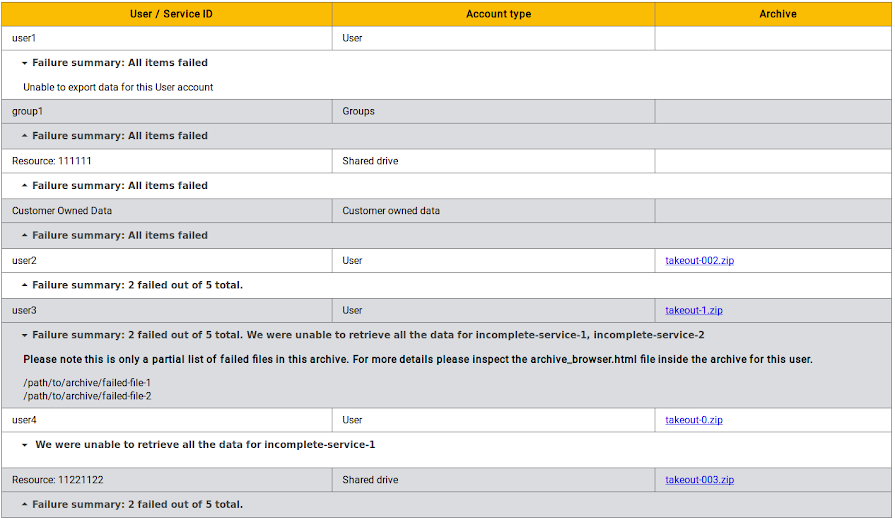
If any export errors occurred, the report includes the following details:
- User/Service ID—Username of a user account, group name, or ID of the service account for which there were export failures. Accounts are in alphabetical order.
- Account type—Can be one of the following types:
- User
- Group
- Customer-owned data—Files owned by your organization, not individual users
Note: The report shows some specific types of customer-owned data, such as shared drives. These files are listed as "Resource."
- Service account—Account that was automatically created for data without an owner, such as Google Jamboard content
- Archive—Links to archive files with the content owned by the user or service account.
- Failure summary—The number of files that were exported and the number that weren't exported. To see a list of files that weren't exported, click the arrow to the left of the failure summary.
Example report with export errors