You can set up your YouTube channels to be managed by just you or by multiple people. You can choose from one of the following options for a YouTube channel:
- Connect it to your personal Google Account: The channel will use your Google Account name and photo.
- Connect it to a Brand Account: The YouTube channel can use a different name than the one you use on your Google Account.
We encourage you to link your channel to either a Brand Account or your personal Google Account. Linking can help to validate your channel identity.
Use your Google Account
A Google Account is specific to just one person, so it uses one name and identity across all Google services, including on any YouTube channel that is connected.

If you connect your YouTube channel to your Google Account:
- Who can manage the channel: Only you can access the YouTube channel and you have to use your Google Account.
- What name and photo show: The YouTube channel uses the same name and photo as your Google Account (and rest of your Google services, like Gmail or Google Docs).
Use a Brand Account
A YouTube channel connected to a Brand Account can be shared across multiple accounts.

If you connect your YouTube channel to a Brand Account:
- Who can manage and own the channel: Multiple Google Accounts can manage and own a Brand Account, and any of those managers and owners can also access the YouTube channel connected to the Brand Account. If you add other owners to the channel, they can take full actions on it, including deleting the channel and removing other owners.
- What name and photo show: The YouTube channel can have a different name and photo from your Google Account and any manager Google Accounts.
Use Brand Accounts managed by your Google Account
You can use one Google Account to manage multiple Brand Accounts connected to YouTube channels.
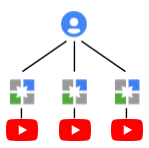
If you connect your YouTube channel to a Brand Account that's managed only by your Google Account:
- Who can manage the channel: If you have multiple YouTube channels connected to Brand Accounts, you can manage them all through one Google Account without signing out. Learn how to switch between channels you manage.
- What name and photo show: The YouTube channel can have a different name and photo from your Google Account and any of the Brand Accounts it manages.